










Embrilliance Enthusiast Embroidery Software
- Regular price
- $189.99
- Regular price
-
$222.99 - Sale price
- $189.99
- Percent Saved
- Save 14%

Non-returnable items
Non-returnable items


Price-Match Guarantee
Price-Match Guarantee
Embrilliance Enthusiast Embroidery Software Details
Embrilliance believes that embroidery should be fun, easy, and affordable for everyone. The Embrilliance Enthusiast Embroidery Software is packed with all the essential tools the everyday embroiderer desires. With Embrilliance Enthusiast, you have the advantage of refined stitch file editing and composition, automated Knockdown™ stitching, custom hoops and thread palettes, and advanced manual density and pull compensation adjustment tools. The software can be used with either a Mac or a Windows PC, and there is no limit to the number of times you can install it! Edit stitches, remove jumps, and select and separate portions of a stitch file, all with the Embrilliance easy-to-use stitch selection tools. If you are ready to upgrade from Embrilliance Essentials for more of a challenge, the Embrilliance Enthusiast Embroidery Software is what you desire. Other Embrilliance programs and tools (sold separately) can be merged with the Embrilliance Essentials Software.

Knockdown Stitches
When sewing on terry or any other fabric with loops and nap, you normally need to use a stabilizer. Using the Knockdown Stitches, you create a global underlay for the entire design, extending a few millimeters past the edge of the design. The Parameterized Knockdown allows you to adjust the distance the Knockdown Stitch extends. The automated Knockdown tool is exclusive to Embrilliance Enthusiast.

Stitch Editing
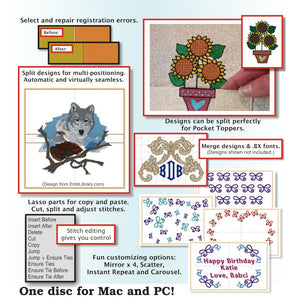
Use the lasso, rectangle, or paintbrush selection tool to select an element. Move, remove, rotate, copy, paste, recolor, and re-use any part of your design to your liking! From easy alterations to full design makeovers, Enthusiast allows you to make the most of your design collection!

Split Design
Embrilliance Enthusiast has built-in embroidery design splitting technology, letting you split your designs using built-in hoop templates. They will be split so that the seams between positions are less apparent, producing a smooth finish!

Instant Repeat
Create tiled patterns by repeating designs in a grid set to a number of repeats and spacing, with additional controls to stagger, flip, and mirror designs.

Carousel
Create circles and ovals from your embroidery designs, with control over the number, rotation, and angle of the repeats.

Mirror X4
Mirror your design 4X to create easy corner designs. Perfectly set corner designs in all four corners of the hoop to your determined measurements.

Scatter
Easily create a randomized pattern for all-over embroidery. Specify the width and height of the area and choose whether the design can be rotated or mirrored at random.

Thread Palette Editor
When combined with Essentials, the Embrilliance Enthusiast advanced palette editor allows you to make your own embroidery thread brand charts and pick colors directly from web pages or PDFs with the color grabber tool.
- Compatible with Mac OSX 10.9 – MacOS 11.6
- Compatible with Windows (32, 64): XP, Vista, 7, 8, 10, 11

Embrilliance believes that embroidery should be fun, easy, and affordable for everyone. The Embrilliance Enthusiast Embroidery Software is packed with all the essential tools the everyday embroiderer desires. With Embrilliance Enthusiast, you have the advantage of refined stitch file editing and composition, automated Knockdown™ stitching, custom hoops and thread palettes, and advanced manual density and pull compensation adjustment tools. The software can be used with either a Mac or a Windows PC, and there is no limit to the number of times you can install it! Edit stitches, remove jumps, and select and separate portions of a stitch file, all with the Embrilliance easy-to-use stitch selection tools. If you are ready to upgrade from Embrilliance Essentials for more of a challenge, the Embrilliance Enthusiast Embroidery Software is what you desire. Other Embrilliance programs and tools (sold separately) can be merged with the Embrilliance Essentials Software.
Knockdown Stitches
When sewing on terry or any other fabric with loops and nap, you normally need to use a stabilizer. Using the Knockdown Stitches, you create a global underlay for the entire design, extending a few millimeters past the edge of the design. The Parameterized Knockdown allows you to adjust the distance the Knockdown Stitch extends. The automated Knockdown tool is exclusive to Embrilliance Enthusiast.
Stitch Editing
Use the lasso, rectangle, or paintbrush selection tool to select an element. Move, remove, rotate, copy, paste, recolor, and re-use any part of your design to your liking! From easy alterations to full design makeovers, Enthusiast allows you to make the most of your design collection!
Split Design
Embrilliance Enthusiast has built-in embroidery design splitting technology, letting you split your designs using built-in hoop templates. They will be split so that the seams between positions are less apparent, producing a smooth finish!
Instant Repeat
Create tiled patterns by repeating designs in a grid set to a number of repeats and spacing, with additional controls to stagger, flip, and mirror designs.
Carousel
Create circles and ovals from your embroidery designs, with control over the number, rotation, and angle of the repeats.
Mirror X4
Mirror your design 4X to create easy corner designs. Perfectly set corner designs in all four corners of the hoop to your determined measurements.
Scatter
Easily create a randomized pattern for all-over embroidery. Specify the width and height of the area and choose whether the design can be rotated or mirrored at random.
Thread Palette Editor
When combined with Essentials, the Embrilliance Enthusiast advanced palette editor allows you to make your own embroidery thread brand charts and pick colors directly from web pages or PDFs with the color grabber tool.
- Compatible with Mac OSX 10.9 – MacOS 11.6
- Compatible with Windows (32, 64): XP, Vista, 7, 8, 10, 11


